Slope Unblocked — Play Free Online
More Runners & Dash games






Slope unblocked: play Slope online free right here in your browser — no download, no sign-up, works on a school Chromebook.
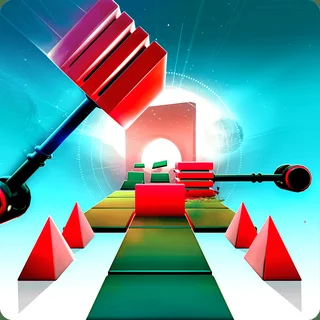
Slope is a fast-paced 3D endless runner where you steer a rolling ball down a steep, neon-lit downhill course suspended in space. From the second the round begins, gravity takes over and pulls your sphere forward at ever-increasing speeds. Your only objective is to survive as long as possible by navigating sudden drop-offs, jumping off ramps, and steering clear of lethal red obstacles that shatter your ball on impact.
The appeal lies in its escalating intensity and instantaneous restarts. Much like Pixel Speedrun and other precision reaction games, every mistake is entirely your own, whether you overcorrected on a narrow bridge or misjudged a leap across empty space. The course layout changes dynamically as you descend, meaning you must rely on pure spatial awareness and rapid reflexes rather than memorizing static tracks.
How to play
The control scheme in Slope is straightforward and responsive, designed for quick keyboard inputs:
- Steer Left: Press the Left Arrow key or A.
- Steer Right: Press the Right Arrow key or D.
A run starts the moment you drop onto the first ramp. As your ball rolls downhill, keep it centered on the green platforms while avoiding all red blocks and walls. Touching any red surface or tumbling off the track instantly ends your run and records your final score based on distance traveled. Hitting restart puts you immediately back at the top for another attempt.
Tips for longer runs
- Use brief key taps: Holding down directional keys makes the ball slide erratically and often sends you flying off the edges. Use quick, gentle taps to make fine adjustments.
- Look ahead of your ball: Do not stare directly at your sphere. Focus your eyes several platforms ahead so you can anticipate red blocks, narrow bridges, and sudden angle changes before reaching them.
- Center before ramps: When approaching a launch ramp or a steep incline, position your ball squarely in the middle of the path. Launching from an edge increases the risk of drifting into open air mid-jump.
- Ride the platform slopes: Angled surfaces cause your ball to drift sideways due to momentum. Steer slightly against the tilt to maintain a stable line through curved sections.
Similar games on Pixel Speedrun
If you enjoy the reflex tests and score-chasing thrill of Slope, several other titles on Pixel Speedrun offer a similar challenge. Dreadhead Parkour focuses on momentum and obstacle avoidance through acrobatic jumps, while Big Tower Tiny Square 2 tests your platforming patience across a giant multi-screen climb. For players who enjoy quick retries and subversive mechanics, Level Devil provides chaotic stage hazards that keep you on your toes.
Slope runs directly in your browser using standard HTML5 and WebGL, requiring no installation or extra setup. It is best enjoyed with a physical keyboard on a desktop or laptop where quick arrow key inputs give you the exact precision needed for record-breaking runs.
Questions about Slope
Is Slope unblocked at school?
Slope runs in an ordinary browser tab from pixelspeedrun.com, with nothing to download or install, so it plays on most school Chromebooks and work computers. If a network filter blocks the site, only that network's administrator can change it.
What are the controls for Slope?
Use the Left and Right Arrow keys or the A and D keys to steer the ball left and right. There is no jump button; ramps automatically launch your ball across gaps.
How is the score calculated in Slope?
Your score increases by one point for every platform section successfully crossed. The longer you survive and the further downhill you travel, the higher your score.
Why does the game get faster over time?
Slope is designed as an endless survival challenge where gravity and momentum continuously accelerate your ball, testing how quickly you can react to obstacles.
Can I play Slope on a Chromebook or laptop?
Yes. Slope runs directly in any modern web browser with WebGL support, making it smooth to play on laptops, desktops, and Chromebooks using keyboard controls.