Pixel Speedrun Controls and Level Guide: Double Jumps, Wall Jumps and Lava
Published · 2 min read
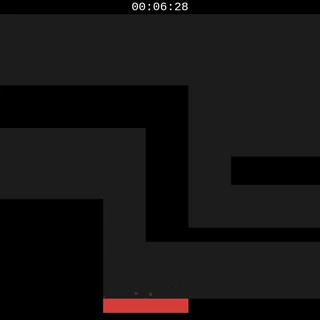
Pixel Speedrun looks simple: a white square, dark rooms, red lava and a gold diamond. What makes it hard is the clock. It starts after a three-second countdown and counts every hundredth of a second until the last diamond, deaths included. This guide covers the controls, what each level type throws at you, and the habits that take the most time off a run.
The controls, all of them
Move with A and D or the left and right arrows. Jump with W, the up arrow or Space. There is no run button, so the square always moves at full speed. That is exactly why you have to steer it carefully.
Double jump. Press jump again in the air for one more jump. If you have trouble keeping track, Settings has a Doublejump indicator switch that shows whether it is still available.
Wall jump. Push into a wall while falling and the square slides down it. Jump from there and it kicks off the other way. Corridors in Pixel Speedrun are narrow, and climbing between two walls is often the fastest way up.
R works differently by mode. In Classic it throws the run away: back to level 1, timer at 00:00:00. In Practice it restarts the level you are on and its timer. Dying never resets the Classic clock, it only puts you back at the start of the current level.
What the levels are made of
- Lava. The red blocks. Touch one and you are back at the level start. Level 1 has six, and level 20 has more than 170.
- Shooters. Orange enemies arrive in level 3 and fire shots across the room. They come back often, eight of them in level 20.
- Locked doors. From level 8, the diamond is behind doors that have to be opened first. Level 15 has fifteen door pieces, so learn the order before you worry about speed.
- Coins. Every level has them, but they only matter in Collect mode. Then the fastest route has to pass all of them.
- The diamond. Touch the gold diamond and the next level loads straight away. The timer keeps running.
Habits that save time
Keep the double jump in reserve. New players jump twice straight away. Hold the second jump until the top of the first arc instead. It carries you further and lets you fix a take-off that came up short.
Take the safe line first. Every death sends you back to the start of the level with the clock running. One death usually costs more time than the few tenths a risky shortcut would save. Learn a level, then tighten it.
Drill in Practice. Practice mode loads any single level on its own. Use it for the rooms that keep killing you, most likely the door levels and the level 20 climb, instead of running the whole game to reach them.
Turn on Live Stats. The Settings switch puts your run stats on screen while you play, so you can see which level is eating your deaths. The same numbers, for your whole history, are on the Stats screen.
Ready to try it? Play Pixel Speedrun, or read the guide to modes, challenges and unlocks.
More from the blog
- Pixel Speedrun Modes, Challenges and Unlocks: Everything Past Classic
Collect, Chaos, Blind, Practice and the five challenges explained, what the Stats screen tracks, how to unlock all eight skins, and the level editor.